Best for
- Learners choosing a dedicated vocabulary workflow
- Readers and listeners who want encountered words to remain connected to content
- Independent learners comparing custom flashcards with prepared review
- Intermediate learners diagnosing whether word recall is the real constraint
Watch for
- Recognising a prompted answer is not the same as recalling or using it independently
- A large saved-word or card count does not prove durable retention
- Prepared vocabulary may not match the words needed for the learner's real input or conversations
- Free access, app-store purchases and recurring plans are different commitments
Documented shortlist
Affiliate disclosure. Links to LingQ in this decision area are affiliate links. We may earn a commission if you buy through them. This does not affect our recommendations. How we fund the Lab
LingQ
DocumentedA self-directed reading and listening environment built around authentic content, saved words and imported material.
Best fit: Learners who want large amounts of reading and listening input
Watch: The open library is not a mandatory linear course
Anki
DocumentedA customisable flashcard system that schedules reviews and lets learners build or import their own decks with text, audio, images and video.
Best fit: Learners who want full control over target words and prompts
Watch: Card quality and context depend on the learner or deck author
Drops
DocumentedA prepared visual-vocabulary app built around short topic sessions, associations and repeated word-and-phrase practice.
Best fit: Learners who want prepared visual topic vocabulary
Watch: Prepared topics do not follow each learner's reading and listening encounters
Clozemaster
DocumentedA sentence-cloze practice platform that reviews missing words in context through multiple-choice or typed recall.
Best fit: Learners reviewing vocabulary inside prepared sentences
Watch: Prepared sentences do not target every learner's personal vocabulary
Side-by-side evidence
Product facts use the documented vendor records; pricing has its own verification date below. Regional offers may change.
Scroll across to compare product details. Prices and billing terms should be confirmed on the official site.
| Criterion | LingQ | Anki | Drops | Clozemaster |
|---|---|---|---|---|
| Learning format | reading, listening, vocabulary, structure | vocabulary, reading, listening | vocabulary, listening, reading | vocabulary, reading, listening |
| Languages | More than 50 languages; the verified selector contained 52 | Language-agnostic user-created content rather than a fixed course catalogue | More than 55 published languages and varieties | More than 50 published languages across over 170 language pairings |
| Level context | All levels are marketed; the open content model is often easiest after the earliest beginner stage | Any level when the learner can select useful material and design or evaluate cards | Vocabulary support across levels; not a complete universal proficiency path | Most useful after a basic foundation when sentence-level vocabulary is the priority |
| Access model | Permanent free tier | Permanent free tier | Permanent free tier | Permanent free tier |
| Free access / trial | Free account with audio and transcripts, up to 20 saved terms, five imported lessons and one playlist | Free desktop software, free AnkiWeb sync and a free contributor-built Android app; the official iOS app is a separate purchase | Limited short daily learning is available without Premium; paid access removes time and content limits | A permanent free route is published; Pro adds advanced features |
| Pricing context | USD web Premium snapshot: $14.99 monthly, $119.99 for 12 months or $215.76 for 24 months; terms are prepaid and locale/channel can change the offer | Desktop, web sync and AnkiDroid are free; AnkiMobile pricing is set separately in the user's App Store region | Public USD offers exist, but currency, promotion and app-store channel can change the checkout amount | Current numeric Pro pricing was not reliably exposed in public HTML; verify the live account offer |
| Pricing checked | Sep 13, 2026 | Sep 7, 2026 | Sep 7, 2026 | Sep 7, 2026 |
| Billing / renewal context | Recurring prepaid plans; first-time Premium purchases have a published 30-day refund window, while later charges are generally non-refundable | There is no single cross-platform subscription; confirm which official or community app is being installed | Monthly and annual offers recur; a one-time option may also be shown. Verify the live renewal and trial terms | Pro is offered through recurring plans; billing and refund terms should be checked at the current checkout |
| Platforms | Web, iOS and Android; offline access is a Premium feature | Windows, macOS, Linux, AnkiWeb, official AnkiMobile for iOS and contributor-built AnkiDroid for Android | iOS and Android, with account-linked access to the current product experience | Web, iOS and Android |
Choose the vocabulary job before the app
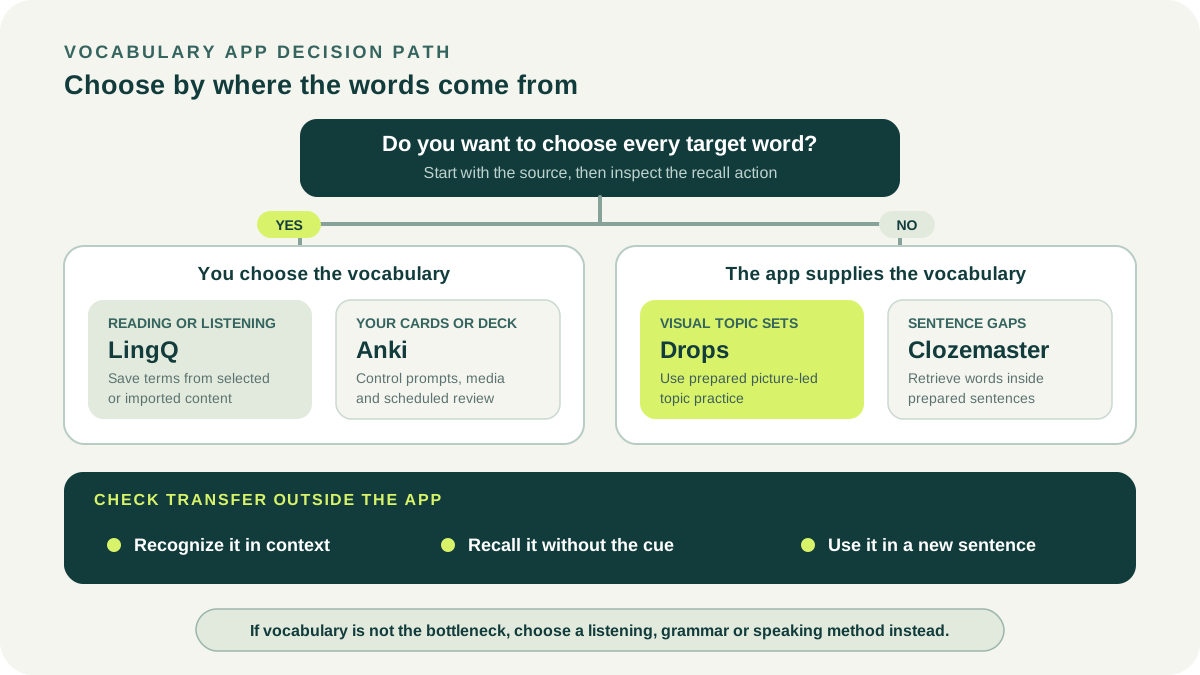
First decide where useful words should come from. A learner working through articles and audio has a different collection problem from someone building a specialist deck, while a beginner who wants a prepared sequence may not want to select any terms at all.
Then define the review action. Seeing a translation, producing an answer from memory and using a word in a new sentence place different demands on recall. The decision path below separates those jobs before convenience or payment enters the comparison.
Choose LingQ for vocabulary found in reading and listening
LingQ's documented workflow begins with selected or imported text and audio. Learners can mark unfamiliar words, save meanings and revisit them in the original lesson and other contexts, so vocabulary collection remains attached to material with a message.
That makes LingQ relevant when reading and listening are already the main activities. It requires the learner to choose suitable content and tolerate an open workflow; it is not a fixed vocabulary syllabus or a substitute for independent speaking practice.
- Best fit: vocabulary encountered in personally relevant input
- Evidence to inspect: whether saved terms become easier in the original passage
- Main limitation: content selection and difficulty control remain learner responsibilities
Choose Anki for control over self-selected cards
Anki is a customizable flashcard system with scheduled reviews, media support and synchronization described on its official site. The desktop application and AnkiWeb are offered without charge, while the official iOS application uses a separate paid app-store purchase; verify the current store terms on the device you will use.
It fits learners who know which words, phrases or specialist distinctions belong in the deck and are willing to design useful prompts. That control creates setup work, and copied public decks can preserve someone else's priorities or weak card design.
- Best fit: personally selected cards and detailed scheduling control
- Evidence to inspect: recall before revealing the answer, not deck size
- Main limitation: card selection, prompt quality and maintenance are user work
Choose Drops for prepared visual topic practice
Drops describes a picture-led vocabulary experience organized into prepared topics and short sessions. It reduces card-building work and can make a small daily vocabulary block easy to start.
The tradeoff is less control over which words arrive and how deeply they connect to the learner's current reading, listening or conversation. Use a separate task to check whether an item can be recalled without the visual cue and understood in a new context.
- Best fit: learners who want prepared visual vocabulary rather than deck setup
- Evidence to inspect: uncued recall after the app session
- Main limitation: supplied topics may not match immediate language needs
Choose Clozemaster for prepared sentence-gap review
Clozemaster presents vocabulary through fill-in-the-blank sentences and documents spaced review of those sentences. The surrounding sentence provides more context than an isolated word pair, while the missing item still creates a direct retrieval decision.
Its own positioning places the product beyond the earliest beginner stage. A sentence can be too difficult or ambiguous when too much surrounding language is unknown, so verify that the sentence remains understandable before treating the gap as useful vocabulary practice.
- Best fit: learners with enough foundation to interpret prepared sentences
- Evidence to inspect: correct recall plus understanding of the whole sentence
- Main limitation: prepared sentences may not match the learner's current input or output goals
Separate recognition, retrieval and contextual use
Karpicke and Roediger's foreign-language word-pair experiments found that repeated retrieval after successful learning supported later retention more than repeated study without repeated testing. That supports checking whether an app asks for an answer before revealing it; it does not prove that one commercial app is universally superior.
Kim and Webb found an advantage for spaced over massed practice on delayed vocabulary tests using both flashcards and fill-in-the-blank activities. They did not establish one universal winner between those activity types, so match the format to the job and distribute review across time.
A practical progression is to recognise the item in context, recall it without the original cue and then use it in a new sentence or short response. Difficulty at the last step can reveal that an apparently mastered item remains dependent on the app's prompt.
Run a seven-day decision test
Choose one real source or topic and use only one vocabulary workflow for seven days. Keep the session small enough to finish, and record completed reviews and setup time rather than relying on a streak or the number of items shown.
At the end, sample several studied items away from the app. Try to recall the meaning or form before seeing a cue, understand the item in a fresh sentence and produce one new sentence where appropriate. Continue only if the learning value justifies the preparation and review burden.
- Completed review sessions, not planned sessions
- Minutes spent creating or cleaning study material
- Uncued recall before the answer is shown
- Comprehension or use in a new context
Check access and commitment at the official destination
These products use different access models: free software or web access, separate app-store purchases, limited free use and recurring premium plans. Those models should not be compressed into a single cheapest-app claim.
Open the official page for the exact platform and region, identify whether payment is one-time or recurring, and note renewal or cancellation terms before committing. No current numeric price is treated as universal on this page.
Who should choose none of these as the primary tool?
Choose a structured course when the main problem is grammar sequence, a listening workflow when connected speech remains unclear, or live interaction when responsive feedback is missing. More vocabulary review will not automatically solve those different jobs.
A vocabulary tool can still support the plan, but cap its share of the week and connect saved words to the language activity that exposed the gap. The useful outcome is not a larger collection; it is less support needed during real comprehension or production.
Prefer a ready-made bank of spoken phrases?
Alongside the four vocabulary workflows above, uTalk offers topic-based words and phrases with native-speaker audio and recall games. It may suit you if you want prepared everyday vocabulary to listen to, repeat and review rather than build your own card deck.
Fit and limits: Treat this as a focused vocabulary supplement. Recognition and recall games do not replace extended reading, grammar study or using new words in conversation. Check the available language and topics against your own needs.
Based on uTalk’s product documentation. Confirm current language availability, price and billing terms at uTalk.
Affiliate disclosure. Links to uTalk in this decision area are affiliate links. We may earn a commission if you buy through them. This does not affect our recommendations. How we fund the Lab
Explore uTalkDecision criteria
Primary sources
Material claims link to primary or authoritative sources. A link is not an endorsement.
- LingQ — official learning workflow
- Anki — official product overview
- AnkiMobile — official US App Store listing
- Drops — official learning format
- Drops — official Premium page
- Clozemaster — official learning workflow
- Clozemaster — official access and billing terms
- Karpicke and Roediger — repeated retrieval and retention
- Kim and Webb — spacing in two vocabulary activities
- LingQ: Official pricing
- LingQ: How LingQ works
- LingQ: Subscription terms
- Anki: Official Anki overview and downloads
- Anki: Official Anki manual
- Drops: Official method and language catalogue
- Drops: Official Premium access page
- Clozemaster: Official product and free-access overview
- Clozemaster: Official Pro plan page